




Overview
Waterhammer & Surge Analysis Software
Impulse™ by Datacor : an intuitive visual platform for modeling fluid transients in pipe networks that brings increased productivity to the pipe flow engineer by simplifying the pipe network modeling process, combining drag-and-drop modeling with traditional engineering hydraulic analysis.
Impulse can show both input data and analysis results in visual form, allowing rapid analysis of a model’s validity. Impulse’s intuitive graphical environment accelerates the identification of erroneous assumptions, typographic and modeling errors as well as re-running models, all with the click of a cursor.
Whether you need to evaluate and improve an existing system or design a new one, Impulse greatly improves productivity in the modeling process.

Predict Pressure Surge
Calculate pressure surges and size equipment to safeguard your system.
Scenario Manager
Track and compare multiple design or operating cases within one file, enabling rapid “what‑if” comparisons
Visual Reporting
Animate events and export clear graphs and data for quick insights.
What can Impulse do?
Impulse can be used to model a wide variety of incompressible flow systems, including :
- Open and closed (recirculating) systems
- Network systems that branch or loop, with no limit on the number of loops
- Systems with valve transients
- Systems with pump transients
- Systems with pressure or flow control valve transients
- Systems with transient cavitation and liquid column separation
- Systems with surge suppression devices such as accumulators, surge tanks and air valves
- Systems with variable density and viscosity
- Multiple design cases in a single model file (Scenario Manager)
- Non-Newtonian fluid behavior
Impulse’s steady-state solution engine is based on benchmark methods used for many years in industry. The Newton-Raphson method is used to solve the fundamental equations of pipe flow that govern mass and momentum balance. Solutions are obtained by iteration, and matrix methods optimized for speed are employed to obtain convergence.
Once a steady-state solution is obtained, Impulse simulates the transient using the Method of Characteristics, the most widely used method for solving fluid transient problems.
Who can use Impulse?
The user should possess a good general knowledge of engineering pipe system hydraulics, with at least a basic understanding of the fluid transients and surge phenomenon. Even the most advanced and easy-to-use software package can’t compensate for a lack of fundamental knowledge on the part of the user.
Innovations
Impulse Highlights

Impulse Highlights
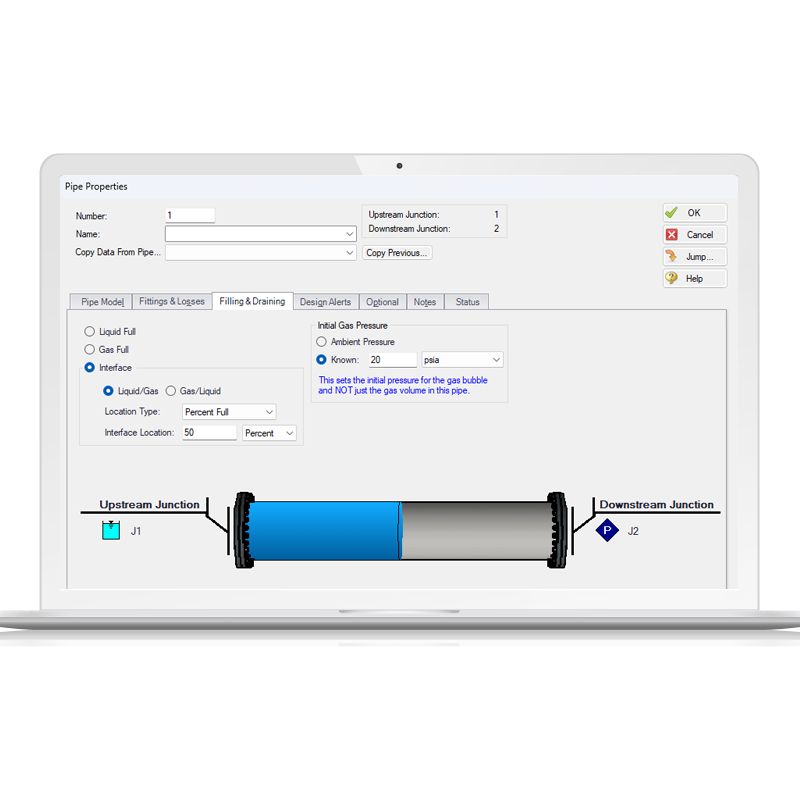
Pipe Filling and Draining
This feature tracks the propagation of multiple liquid-gas interfaces across a piping network. The liquid phase and the moving front are solved via the Method of Characteristics (MOC), while the gas phase is modeled as a lumped compressible volume. This hybrid approach accurately captures transient phenomena such as line draining, flow splitting, and trapped gas pockets, while fully resolving hydraulic surge effects in the liquid column.
Impulse Highlights
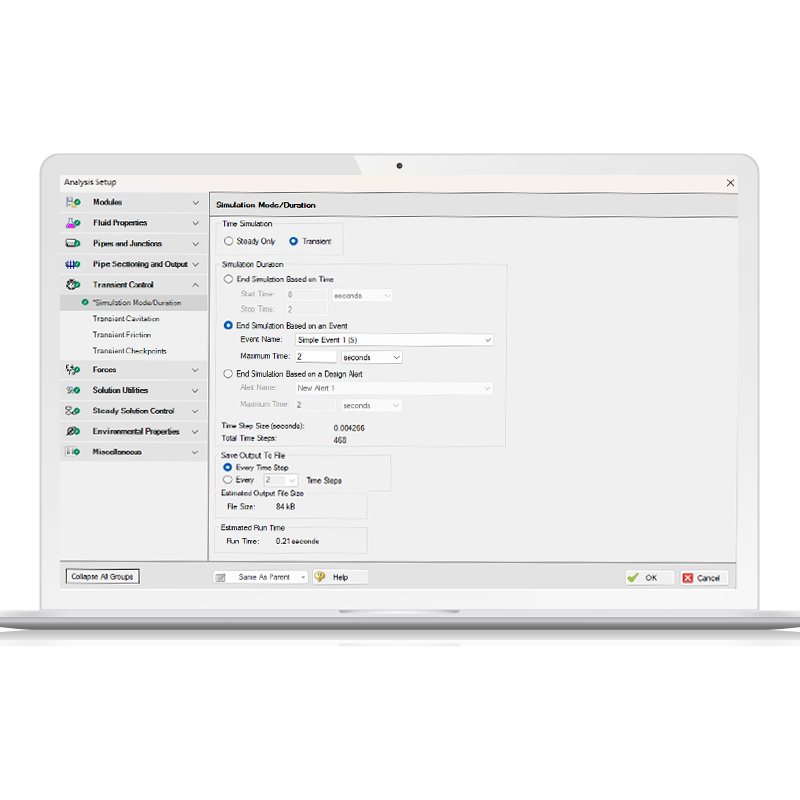
End Transient Run Feature
AFT Impulse and xStream now feature advanced transient simulation termination criteria, moving beyond fixed-time stops. Users can programmatically halt a run based on specific transient events or when a user-defined Design Alert is triggered (e.g., pressure exceeding a threshold in a given pipe). Upon an alert- or event-driven termination, the solver truncates the output file, generates a checkpoint file for seamless restarts, and logs an informational warning in the Message Manager.
Impulse Highlights
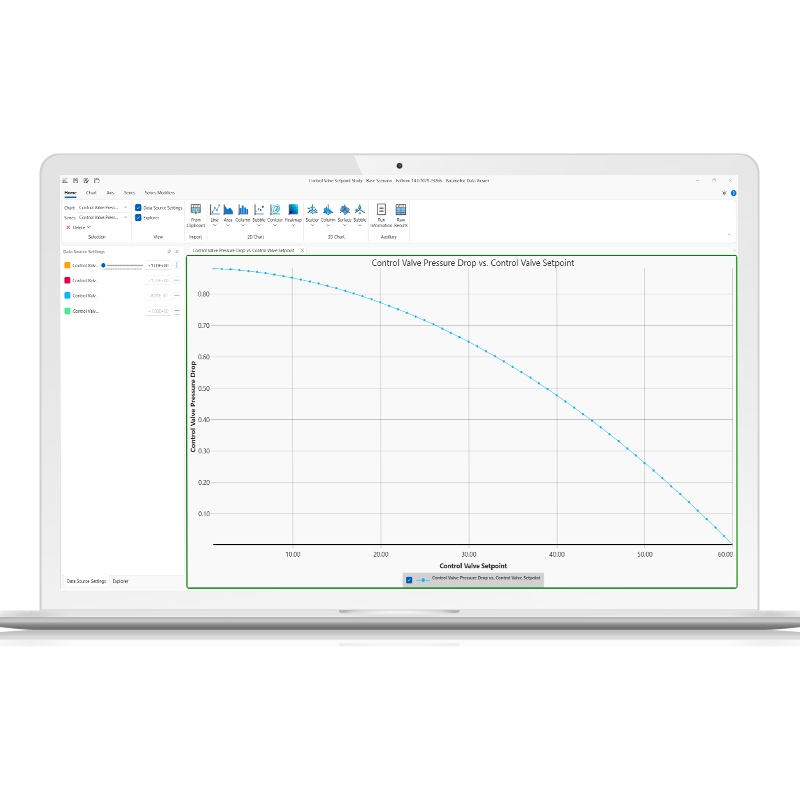
Parametric Study Tool
This tool streamlines transient and steady-state analysis through systematic input variation and automated scenario generation. It enhances sensitivity analysis by identifying dominant system variables, offering a robust alternative when standard goal-seeking methods struggle. Through graphical trend mapping, engineers can easily evaluate trade-offs, optimize operating envelopes, and pinpoint critical components for model calibration.
Impulse Highlights
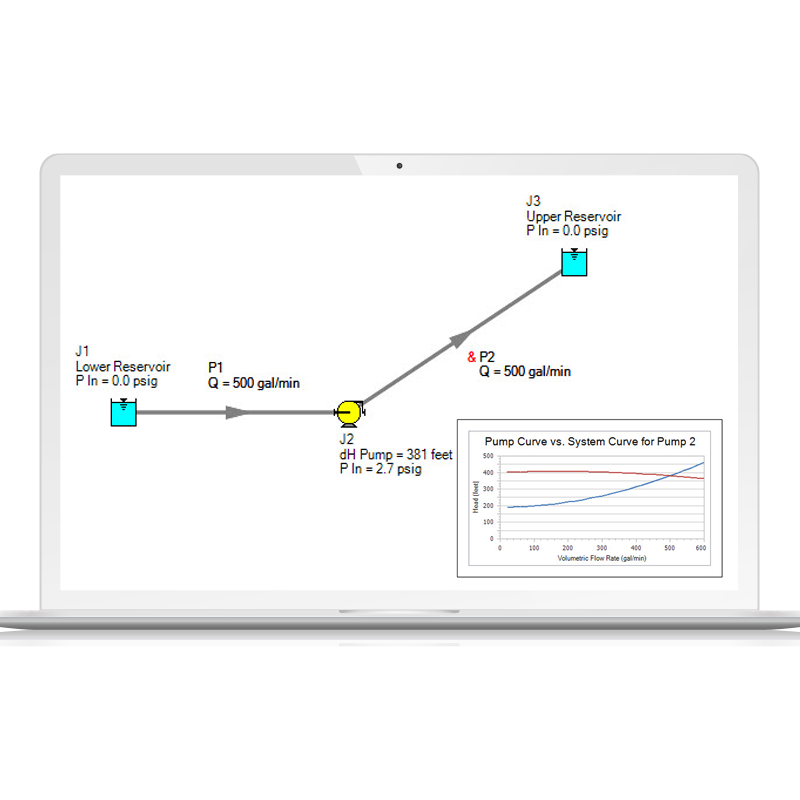
Graph Annotations
This feature integrates dynamic, auto-updating plots directly into the Workspace, streamlining model verification. These persistent, resizable graphical overlays allow for immediate comparison of simulation results without forcing the user to switch to the Graph Results tab. Behaving similarly to Color Map layers, Graph Annotations automatically sync and refresh whenever new Output data is generated. Users can easily instantiate a plot via the Toolbox, select the target parameters, and embed it into the schematic. This reduces post-processing clicks and accelerates iterative design analysis.
Add-on modules
Impulse add-on Modules
Impulse has two add-on modules that extend modeling capabilities.
Pulsation Frequency Analysis (PFA)
Pulsation Frequency Analysis (PFA) allows the engineer to study the pressure pulsation effects a positive displacement pump has on a system.
- Predict resonant frequencies
- Graphically show the frequency response of a system
- Examine the pressure response of a system when a positive displacement pump is
- running at a resonant frequency
- Ensure the pressure pulsation magnitudes comply with the API-674 standard
Settling Slurry (SSL)
Settling Slurry (SSL) allows the engineer to perform waterhammer analysis while accounting for the complex property and system interactions associated with slurry flows.
- Model homogeneous and pseudo-homogeneous slurry mixtures
- Slurry pump performance derating
Contact
Request a Demo
Schedule a brief meeting with our team to walk through the software and find out why it’s the industry standard for incompressible flow analysis.